240 Comments
Scanline Text
August 12, 2008I thought I’d write a tutorial aimed more at beginners, teaching you how to achieve the all important glowing effect which people can’t seem to get enough of. Here we will create a style I’ve named ‘Scanline Text’ which is basically text which glows like bright scanlines, with a smart reflection as well. So learn out how to create this amazing yet simple effect with this easy to follow tutorial.
Tutorial Files
If you are a PSD PRO member then download the PSD file and much more by going here.
Introduction
Glowing effects are everywhere, I even wrote another tutorial on getting the effect which you could combine with this one. I wanted to write this as most of my tutorials are aimed towards intermediate or advanced Photoshop users whereas this is purely beginner but I’m sure You’ll all learn something from it. This is my first tutorial to adopt User Images so make sure you upload the result you get once you’ve finished.

Step 1
Create a new document with dimensions; 1x20px, this will the document we create our scanline pattern in. Go Edit>Preferences>Grid then set the grid to every 1px with 1 subdivision. Create a new layer then hide the background layer. Select the rectangle tool and change the foreground color to white. Now draw a 1x2px rectangle in the middle of the document like in the image below. Go Edit>Define Pattern and save this as a pattern. You can now close this document.

Step 2
Create a new document with dimensions; 1000x1000px then select the gradient tool and open the gradient editor. Use a gradient going from a dark color to black, I used a dark purple. With the gradient set at radial, drag from the middle of the document outwards.

Step 3
Use the text tool to type something in the middle of the document in white. Now go Window>Character then change the settings to suit, for example I used Times New Roman, 300pt and tracking of 100. It should now look similar to the image shown below. Now create a new layer then hit Alt+Backspace to fill it with the foreground color; it doesn’t matter what this is. Ctrl+click on the text layer to make a selection around the text, with the new layer we just created still active click the layer mask button in the layers panel. Now hide the text layer then select the layer mask you just added and go Filter>Blur>Gaussian Blur and use a value of 10px. Set the fill opacity of this layer to 0%.

Step 4
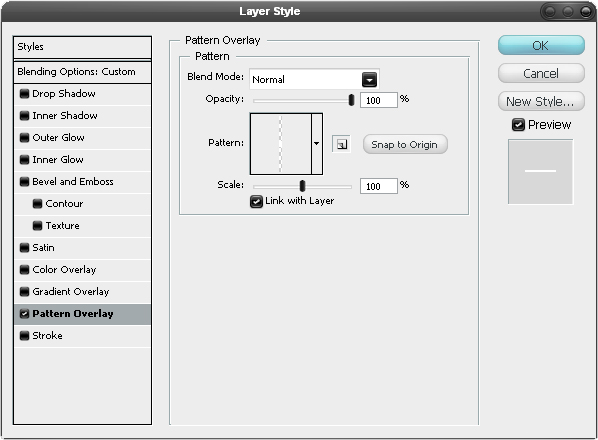
Right click on this layer and select blending options, us the settings shown below to add a pattern overlay using the pattern you created earlier.
Step 5
You can now alter the opacity of this layer to suit you but I always end up going back and changing settings like this later on so don’t worry if it doesn’t match mine exactly.

Step 6
Create some more text like shown in the image below, here I used an even larger value for the tracking because I find that serif fonts in uppercase look better when the characters are spaced out. Again make them white.

Step 7
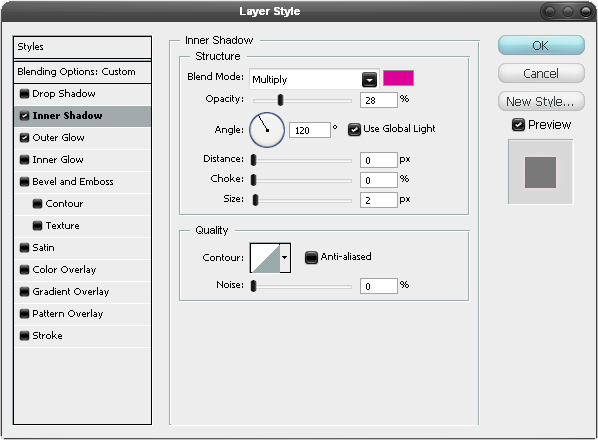
Right click on this text layer and select blending options then add an inner shadow and outer glow with the settings shown below. If you used a color other than purple for the background you may want to use colors with a different hue for both of these for example; cyan for a blue background. Things like this can easily be changed later on anyway.

Step 8
Put both of the these visible layers within a new layer group then duplicate this group.

Step 9
With the new layer group selected, go Edit>Transform>Flip Vertical then hit V to select the move tool then move it down so it starts to look like a reflection.
Step 10
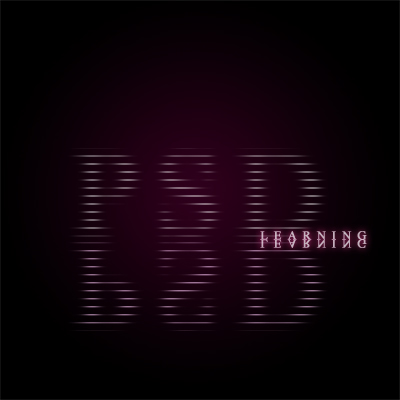
With the reflection layer group still selected click the layer mask button then with the mask selected use the gradient tool to draw a gradient going from black to white, from the bottom of the reflection to the top of it. If you did this correctly, your image should resemble the one shown below.

Step 11
Create a new layer then hit D to reset the colors then go Filter>Render>Clouds.

Step 12
Hit Ctrl+T to enter free transform mode then squash the image down vertically then goe Edit>Transform>Perspective and move the handle at one of the bottom corners outwards. Next go Filter>Blur>Gaussian Blur and use a value of 10px.

Step 13
Change the opacity of this layer to 10%.

Step 14
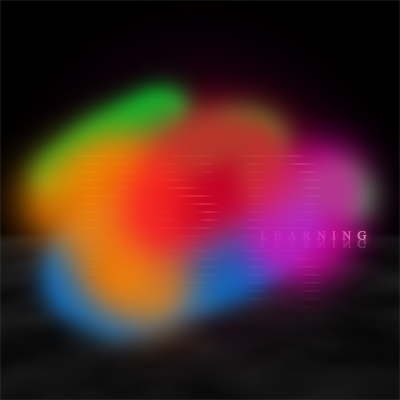
Create a new layer, select the brush tool and using a soft brush, make some brightly colored strokes like shown in the image below.
Step 15
Add a Gaussian blur to this layer with a value of 100px then change the opacity of this layer to 50%.

Step 16
Now just change the blend mode to color. I went back and tweaked a few settings to do with color and opacity mainly and below is my final result.

Similar Tutorials:
Save and Share this Post
We like people who share our posts! Del.Icio.Us - StumbleUpon - Float - Reddit


August 13th, 2008
Lori:
This is a great tutorial for any skill level in Photoshop. Simple and concise instructions, with a beautiful result. Thanks!
August 13th, 2008
Ross:
Thanks Lori glad you like it:)
August 14th, 2008
Jay:
Great instructions for a beginner’s use!
August 14th, 2008
nitos:
that was amazing!, hope you continue with tutorials like this! :P
August 15th, 2008
Tom Ross:
Nice tutorial Ross. Personally I’d make the clouds in the final result a little less obvious, but apart from that good job :).
August 16th, 2008
shinebabu.r:
nice ya …i got some more idea
August 17th, 2008
Alen:
Nice tutorial. It is featured on my site:
http://psdnewsbox.com/2008/08/17/tutorial-of-the-week-2/
August 21st, 2008
Ryan G:
Thank you so much for this.
August 22nd, 2008
Ross:
Thanks for the comments guys, I’ll try and make a few more tutorials like this soon.
August 26th, 2008
40 Dark and Futuristic Photoshop Effects - PSDTUTS:
[...] 6. Scan-line text [...]
August 27th, 2008
John:
Hey I only have one problem. The first step says “Go Edit>Preferences>Grid” but there is no “Preferences” option in my edit menu…. Using Photoshop CS3. Screenshot of my Edit menu. Either I’m Dyslexic or it isn’t there.
http://img180.imageshack.us/img180/2330/picture1ww5.png
August 27th, 2008
Ross:
John,
This is one of the few differences between the Mac version and the PC version; on a Mac you will find the preferences under the Photoshop menu instead of the Edit menu. I’ll remember to mention that in the future.
August 29th, 2008
25 Brilliant Glow Effects | Learning Resources for Adobe Photoshop:
[...] Ross:John, This is one of the few differences between the Mac ve… [...]
August 29th, 2008
Useful blog » Blog Archive » 40 Dark and Futuristic Photoshop Effects:
[...] 6. Scan-line text [...]
August 31st, 2008
Kalapi:
Amazing Tutorial!!! Thanks a ton!!
September 1st, 2008
40 Futuristic Photoshop Effects by PSDtuts « Guiwells’s Blog:
[...] 6. Scan-line text [...]
September 6th, 2008
Cloud No9:
Simple yet so impressive!
One question though: At Step 3 “Ctrl+click on the text layer to make a selection around the text, with the new layer we just created still active click the layer mask button in the layers panel. Now hide the text layer then select the layer mask you just added and go Filter>Blur>Gaussian Blur and use a value of 10px. Set the fill opacity of this layer to 0%.” When adding the layer mask I get my layer linked with a mask layer. Then when I hide the text layer all options in the Filter menu become inactive and thus cannot add blur effects. What am I doing wrong? I use CS3.
Given this opportunity I want to share with you the fact that I had to set my grids at 2 so that Photoshop wouldn’t show a grid with 2/3 of pixel. It sounds weird but this is what I experienced when set it as described.
Thnx in advance! I’d really appreciated your reply.
Cloud No9
September 6th, 2008
Ross:
Cloud No9,
If I’m picking you up right then I think what you’ve done is tried to add the filter to the text layer, in step three I said to create a new layer then Ctrl+click the text layer then go back and select the new layer as this is the layer you want to add a mask to. So you don’t want to hide this layer even though it has text on it you want to hide the original text layer. Hope that helps and let me know it works:)
September 8th, 2008
Aric:
I’m also having some problems with step 3. can you maybe be a bit clearer on the instructions?
“Ctrl+click on the text layer to make a selection around the text, with the new layer we just created still active click the layer mask button in the layers panel.” when I try and follow the instructions past this point it gets confusing because when I ctrl click (as with most things) it selects both layers and then doesn’t allow a mask to be created. when I try and mask either layer, and set the pattern, instead of applying the pattern to the text, it applies it to the entire image, and the result is white horizontal stripes abrasively covering the document. For some reason i just can’t seem to realize what I’m doing wrong. (quite a bit of photoshop xp, but I have been without it for about 2 years.)
September 10th, 2008
jorisx:
a faster way to create a scan line text (which is also editable)
- create your text
- set the fill to 0
- create a smart object from the text layer
- apply the smart filter gaussian blur (10px)
- apply the pattern overlay layer effect (your scan line pattern)
voila :-)
and you are still able to edit everything from text to blur
;-)
September 10th, 2008
jorisx:
just one more thing.
wait with setting the fill of the text layer to zerro after you aply the blur, other wise the blur can’t be set …
- create your text
- create a smart object from the text layer
- apply the smart filter “gaussian blur” (10px)
- open your smart object (double click on the layer)
- set the fill of the text to 0
- close the smart layer (you will be asked to save the changes)
- apply the “pattern overlay” layer effect (your scan line pattern)
September 11th, 2008
Gustavo:
I’m quite amazed by your skills, talent and your ability to teach with simple and easy to follow instructions.
Thank you for taking the time to post this tutorial.
Good job!
P.S. How do you come up with these ideas? That’s the part I’m having a hard time figuring out!
September 11th, 2008
Ross:
Gustavo,
Thanks for the comment, glad you like these tutorials. For me the hardest part is coming up with the idea, once I’ve got the idea I find it easy to transfer it to Photoshop (something that comes with practice). With a lot of my tutorials I use other peoples work as inspiration or sometimes even try to mimic an effect that someone else has created. The reason for this is because it’s often too time consuming to think up an original idea and make a tutorial on it; especially when I’m writing a tutorial every couple of days, it means I can get more tutorials out if I’m not spending ages thinking up my own ideas.
September 12th, 2008
MaNshY:
Awesome man, I love this tutorial easy steps and good one .
Keep it up man, see ya
September 12th, 2008
Craig:
Can’t get it to work…the scan line pattern does nothing. The Pshop built-in patterns work…dunno what I did wrong, I followed the instructions exactly. : – (
September 17th, 2008
Photoshop Tutorials at Blackstone Media Blog:
[...] Blending Two Images Tutorial Harsh Lighting Tutorial Rounded Edges Tutorial Light Beam Tutorial Scanline Text Luminescent Lines 3d Pixel Stretch Effects Stunning 3D Effects Eeiry Eye Photo Manipulation Liquid [...]
September 18th, 2008
Andie:
This is a great tutorial! I found it very easy to follow, and I am a beginner. I am happy with the result I got. Thanks!
September 19th, 2008
Martin Poku Otabil:
I wish to no more about PHOTOSHOP and EFFECTS.
Can you send me some tutorials book on Photoshop and all about the programmer.
September 19th, 2008
PhotoShop » Blog Archive » 40 Dark and Futuristic Photoshop Effects:
[...] 6. Scan-line text [...]
September 20th, 2008
50+ Great Photoshop Text Effect Tutorials, Part II | Photoshop Tutorial:
[...] Scanline Text [...]
September 25th, 2008
AllTuts:
Scanline Text Effect…
Here we will create a style named ‘Scanline Text’ which is basically text which glows like bright scanlines, with a smart reflection as well.
……
September 25th, 2008
Webclave.com » Blog Archive » 40 Futuristic Photoshop Effects by PSDtuts:
[...] 6. Scan-line text [...]
September 28th, 2008
50 nuovi Effetti di Testo per Adobe Photoshop | Giuseppe D'Alessio Live Blog - Tecnologia, società e vita in un sorso...:
[...] Scanline Text [...]
October 11th, 2008
SITA SHARMA:
Dear Sir I really appreciate with your creativity, i have done all things but i m just getting confuse that step four like masking the layer & using the purple gradient with radial can u please explain me briefly thanks & rgds
October 11th, 2008
50+ tutorials per creare testi d’effetto in photoshop | Lordmarin:
[...] Scanline Text [...]
November 5th, 2008
51 Photoshop Text Effect Tutorials | Tips For Web Users:
[...] Scanline Text [...]
November 15th, 2008
solo sexo:
Here is much work done, obviously. Good site
November 17th, 2008
Daniel Leon:
Hey, good tutorial, realy cool effect.
But i cant get it right. I’ve made the pattern, and I have done everything exactly as you describe. but the pattern wont work. the text is all white.
can you please help me with this?
November 27th, 2008
Every Great Photoshop Lighting Tutorial Ever! (Part 2 of 3) - psdfan.com -:
[...] 49. Scanline Text [...]
December 1st, 2008
20+ Great Photoshop Text Effect Tutorial |:
[...] 15. Scanline Text [...]
December 3rd, 2008
Every Great Photoshop Lighting Tutorial Ever (all 75 of them) - psdfan.com -:
[...] 49. Scanline Text [...]
December 3rd, 2008
Lee:
Great tutorial. Thanks.
December 4th, 2008
godfather74:
thanks for this great tutorial!
December 8th, 2008
Photo Lighting Effects | design | Faze One Studio:
[...] 49. Scanline Text [...]
December 11th, 2008
trolley:
Hi, I love this tutorial but I’m afraid I’m stuck right at the beginning – making the pattern. I’ve made the 1×2 rectangle but when I go to the edit menu the “Define Pattern” option is greyed out. I’m using CS4 on a mac. Any help would be appreciated.
December 12th, 2008
Josh:
nice tutorial… one problem that im having is that everything is good until i go to add the pattern to the text, it doesn’t make any difference. (unless i choose a different pattern)
December 28th, 2008
sdsd:
thanx man
can u giv me Pattern for tut?
January 20th, 2009
65+ Smoking Photoshop Text Effect Tutorials | instantShift:
[...] Twitter Link: Click Here [...]
January 21st, 2009
All Amazing Articles » 50+ Great Photoshop Text Effect Tutorials:
[...] Scanline Text [...]
January 28th, 2009
Ales:
You’re great … i’m a perfect newbie, but with your tutorial, i’m starting to create something nice ! :)
January 30th, 2009
Ultimate List Of 50 Quality Photoshop Tutorials For Your Inner Designer | The Theme Blog:
[...] Scanline Text Glowing, scanline text effects are awesome. [...]
February 4th, 2009
??????? ????? ????????? : ????????? ????? ??? PC ? IPHONE,??????? ????? ?????????,??????? ?????? ?????????,??????? ?????? ?????????, ??????? mp3 ?????????:
[...] Scanline Text [...]
February 9th, 2009
amber:
Found ross’s lingo somewhat pompus, could have been explained much easier without trying to sound clever
March 4th, 2009
realturk:
supper supper supper i love psd learning
March 5th, 2009
50 Stunning Photoshop Text Effect Tutorials | Tutorials | Smashing Magazine:
[...] Scan-line text Create a style dubbed “Scan-Line Text,” which is basically text that glows like bright scan lines, with a smart reflection as well. Learn how to create this amazing yet simple effect with this easy-to-follow tutorial. [...]
March 5th, 2009
50 Stunning Photoshop Text Effect Tutorials | ClickLogin Web Design:
[...] Scan-line text Create a style dubbed “Scan-Line Text,” which is basically text that glows like bright scan lines, with a smart reflection as well. Learn how to create this amazing yet simple effect with this easy-to-follow tutorial. [...]
March 5th, 2009
http://www.digiwu.com » Blog Archive » 50 Stunning Photoshop Text Effect Tutorials:
[...] Scan-line text Create a style dubbed “Scan-Line Text,” which is basically text that glows like bright scan lines, with a smart reflection as well. Learn how to create this amazing yet simple effect with this easy-to-follow tutorial. [...]
March 5th, 2009
50 Stunning Photoshop Text Effect Tutorials | Tech Underground:
[...] Scan-line text Create a style dubbed “Scan-Line Text,” which is basically text that glows like bright scan lines, with a smart reflection as well. Learn how to create this amazing yet simple effect with this easy-to-follow tutorial. [...]
March 6th, 2009
ranganath:
This is Great stuff thanks a lot for this tutorial
March 6th, 2009
20 great text effect tutorials for photoshop | The Roxor | Design blog for resources and inspiration:
[...] Scanline Text [...]
March 7th, 2009
Feed Reader » 50 Stunning Photoshop Text Effect Tutorials:
[...] Scan-line text Create a style dubbed “Scan-Line Text,” which is basically text that glows like bright scan lines, with a smart reflection as well. Learn how to create this amazing yet simple effect with this easy-to-follow tutorial. [...]
March 8th, 2009
Feed Reader (Beta) » 50 Stunning Photoshop Text Effect Tutorials:
[...] Scan-line text Create a style dubbed “Scan-Line Text,” which is basically text that glows like bright scan lines, with a smart reflection as well. Learn how to create this amazing yet simple effect with this easy-to-follow tutorial. [...]
March 8th, 2009
50 New Photoshop Text Effect Tutorials:
[...] Scan-line text Create a style dubbed “Scan-Line Text,” which is basically text that glows like bright scan lines, with a smart reflection as well. Learn how to create this amazing yet simple effect with this easy-to-follow tutorial. [...]
March 8th, 2009
+||ReCharge » Great Photoshop Text Effect Tutorials||+:
[...] Scanline Text [...]
April 23rd, 2009
stevey V:
When I try and set up my grid lines nothing shows. and I was also have trouble making a selection to save the pattern (step 1) I tried selecting the squares with the rectangular marquee and it said “no pixels selected” This was also without the grid lines, They wouldn’t appear? Any advice
April 29th, 2009
Great Photoshop Text Effect Tutorials, Part II « Online Free Applications Software Tips Tools Wallpapers:
[...] Scanline Text [...]
May 1st, 2009
50 Stunning Photoshop Text Effect Tutorials | Design-Tut+:
[...] Scan-line text Create a style dubbed ?Scan-Line Text,? which is basically text that glows like bright scan lines, with a smart reflection as well. Learn how to create this amazing yet simple effect with this easy-to-follow tutorial. [...]
May 6th, 2009
Scanline Text:
[...] Scanline Text [...]
May 9th, 2009
100 + Awesome Text Effect Tutorials in Photoshop – Part II - Photoshop Website - Tutorials,Brushes & more..:
[...] 100.Scanline Text [...]
May 9th, 2009
100 +Awesome Text Effect Tutorials in Photoshop – Part II - Photoshop Website - Tutorials,Brushes & more..:
[...] 100.Scanline Text [...]
May 12th, 2009
mohana:
hi
i not get the strip in psd pl help me thx
May 14th, 2009
Annu rekha:
Very User Freindly Tutorials thanks so much – Annu
May 18th, 2009
syahbar:
it;s very good tutorials,
but can you give more some explaination (step by step) about the first one (make a grid pattern). i really preciatte that. (sorry if my english bad).
Thansk
May 31st, 2009
60 tutoriels Photoshop pour les effets de texte | TuniBOX:
[...] Effet de texte scanné en lignes Un tutoriel simple à suivre qui explique lesdifferentes étapes de réalisation de cet effet étonnant. [...]
June 7th, 2009
Photo Lighting Effects | Faze One Studio - Photgraphy & Design:
[...] 49. Scanline Text [...]
June 13th, 2009
Dioxyportfolio » Blog Archive » The Best 80 Photoshop Text Effects on the Web:
[...] Tutorial Link [...]
June 19th, 2009
Brian:
Can’t get my pattern to change that I made.
June 26th, 2009
50 verblüffende Photoshop-Texteffekt-Tutorials | Dr. Web Magazin:
[...] Scan-line text [...]
July 10th, 2009
cwill:
awesome tutorial ^_^
July 12th, 2009
50+ Great Photoshop Text Effect Tutorials, Part II | DAWG FILE:
[...] Scanline Text [...]
July 23rd, 2009
30 Gorgeous Text Effects of Photoshop | Tutorials Palace:
[...] Scan-line text Create a style dubbed “Scan-Line Text,” which is basically text that glows like bright scan lines, with a smart reflection as well. Learn how to create this amazing yet simple effect with this easy-to-follow tutorial. [...]
July 27th, 2009
Kat:
Hello I cant get the pattern portion to work correctly… can you possibly explane for a larger scale my glow anf type page is 8X10 350px…. please help….
July 29th, 2009
TO 50 STUNNING TEXT EFFECT PHOTOSHOP TUTORIALS « JinSpiration:
[...] Glowing Effect for the Text – Scanline Text [...]
August 21st, 2009
????????? ??????? ?? PHOTOSHOP ???????? ! | ??????? ????? ????????? ??????? ????????? ????? ????? ?????? ?????? , ????????? ??????? ??????, ????????? ?????? ???????, ????????? ??????? ?????, ????????? ??????? ?????, ??????? ?????? ??????, ????????? ????? :
[...] Scanline Text [...]
August 21st, 2009
nofoot:
thanks for great tutorial~
August 30th, 2009
30 Text Effects of Photoshop | Webmaster 9:
[...] Scan-line text [...]
December 16th, 2009
username.txt:
nice tutorial. what theme and operating system are you using? i love the look of your windows and checkboxes.
December 19th, 2009
Metalcation26:
Great tutorial except I can’t get the scanned line pattern to work. I did exactly as it said in the tutorial and when I try to do my pattern overlay, it shows nothing at all. Any advice?
January 2nd, 2010
30 efectos de texto |:
[...] 23. Scanline Text link: http://psdlearning.com/2008/08/scanline-text/ [...]
January 6th, 2010
35 Breathtaking Text Effects using Adobe Photoshop | Smashing Buzz:
[...] Scanline Text [...]
January 14th, 2010
Prince:
Great Work Man I’m in year 2010 and I’m leaving comment on this tutorial is that u really Rocks!
This Tutorial is Awesome but only time conzuming.
I really wanna see your other works plz give me ur site url or blog link so i can learn more.
Thank you Very Much!
July 29th, 2010
shakib wardak:
fuck you all 4lds
July 29th, 2010
15 Tips Trik TextEffect Photoshop « PatriaZone wawasan Islam dan Iptek:
[...] Scanline Text Effect [...]
July 30th, 2010
drew:
i am just a beginner and really not familiar with ps. i am having a problem with the 2nd step. using the gradient. by the time i finished doing it, the background still has a gradient purple-black. instead of having it on the letters. help.
August 10th, 2010
15 Tips Trik Text Effect Photoshop « Triblox Daily News:
[...] Scanline Text Effect [...]
August 18th, 2010
roneybalack:
Photoshop tutorial, from beginner to advanced. Including Photoshop text effect tutorials, photo manipulation tutorials, give you joomla templates,joomla extensions,wordPress theme,web templates,
if you think i make a spam please remove this comment.
thanks.. find more best tutorials here http://download60s.com
August 30th, 2010
flyer templates:
I did not know of this technique. Gonna try this for sure.
Thanks for sharing.
September 9th, 2010
wholesale designer clothes:
Good post. You did a good work,and offer more effective imformation for us! Thank you..
September 10th, 2010
15 TUTORIAL ADOBE PHOTOSHOP « DIKUTIP:
[...] Scanline Text Effect [...]
October 7th, 2010
me:
Hello
first thank u very much for this tut , just i don’t understand the 3thd step plz tell me how do it … thx
October 8th, 2010
56 Awesome Photoshop Text Effect Tutorials you need to learn « 68Design – (68ds.com) Creative Design Transmitter:
[...] Scanline text [...]
October 15th, 2010
Waslim Setiawan:
Thank u very much, it’s very simple way tolearn about photoshop…a like it’s
October 15th, 2010
BlogTipp:
Love this Photoshop tutorials. Thank you very much. Need to try
October 26th, 2010
40+ Eye-Catching Photoshop Text Effects and Tutorials | Design Dim:
[...] Scan-line text Create a style dubbed “Scan-Line Text,” which is basically text that glows like bright scan lines, with a smart reflection as well. Learn how to create this amazing yet simple effect with this easy-to-follow tutorial. [...]
November 4th, 2010
itsme:
i can’t understand how to make a grid? please specify..your instructions are not that clear.
November 5th, 2010
Jose:
Great Tut, but im stuck on step 8 how do i group the layers?
November 17th, 2010
jeritho:
Xvre el tuto man… me dices como puedo hacer para velo en español..????
November 23rd, 2010
25+ Interesting Photoshop Text Effect Tutorials | Dzineblog360:
[...] Scanline Text [...]
November 25th, 2010
50+ Great Photoshop Text Effect Tutorials, Part II « DownGraph – Your Graphic World:
[...] Scanline Text [...]
November 25th, 2010
Adrian:
This is a very helpful tutorial
November 28th, 2010
Scanlines Text:
[...] http://psdlearning.com/2008/08/scanline-text/ VN:F [1.9.6_1107]te rog asteapta…Rating: 0.0/10 (0 votes cast)Tutoriale & resurse [...]
November 28th, 2010
50 Eye Catching Photoshop Text Effects Tutorials | mylivepad.com | My Live Pad!:
[...] 43. Scan-line text [...]
November 29th, 2010
50 Eye Catching Photoshop Text Effects Tutorials | Free Web Design Tucson:
[...] 43. Scan-line text [...]
December 2nd, 2010
50 Eye Catching Photoshop Text Effect Tutorials | :: DesignZine :::
[...] 43. Scan-line text [...]
December 5th, 2010
50?Photoshop??????? | ????:
[...] Scan-line text??????????? [...]
December 15th, 2010
50 Eye Catching Photoshop Text Effect Tutorials « Perfect RS:
[...] 43. Scan-line text [...]
December 22nd, 2010
40 Dark and Futuristic Photoshop Effects | cssWOW:: CSS Gallery:
[...] 6. Scan-line text [...]
December 22nd, 2010
40 Dark and Futuristic Photoshop Effects | Links.d2zone:
[...] 6. Scan-line text [...]
December 22nd, 2010
tutorial adobe photosoft « xliner:
[...] Scanline Text Effect [...]
December 26th, 2010
S3bY:
A very good tutorial..I’ll try this right away!
December 28th, 2010
40 Dark and Futuristic Photoshop Effects « DSJ Galleries Blog:
[...] 6. Scan-line text [...]
January 4th, 2011
15 Photoshop Tutorial Untuk Text Effect « 3mofr3ak:
[...] Scanline Text Effect [...]
January 4th, 2011
PHatDriver:
I used this tut about a year or so ago for my website banner, because I thought it looked that good, and it’s still on my site to this day :o)
Have a look here: http://myweb.tiscali.co.uk/phatdriver/
Now I now a wittle bit more about photoshop and how to use it I could improve on this but it took you to show me first. Credit where credits due.
Thanx again for this tut – it’s great!
Much Love…
January 15th, 2011
Stunning Photoshop Text Effect Tutorials | YusraBlog:
[...] EffectColorful Glowing Text EffectColored Chrome Text EffectChained Text Idea Photo-shop TutorialScanline Text Smart ReflectionSimple Dark But Vivid Text EffectAdvertisement [...]
January 19th, 2011
15 Photoshop Tutorial Untuk Text Effect | Warungsingkawang's Blog All In One:
[...] Scanline Text Effect [...]
January 20th, 2011
forex:
Hello! I am very pleased with the effort and don’t feel like adding anything in it. It a perfect thing which is being done. Keep the good work!
January 21st, 2011
PSlite » Blog Archive » ?????? ????? ?? ?????????? ????? ? ???????:
[...] ?????: Ross August. ??????????: ??? ?????. [...]
February 3rd, 2011
sd1:
Ross your tutorial sucked. Better luck next time
February 15th, 2011
50+ Great Photoshop Text Effect Tutorials Part II | Webwibe | Webwibe:
[...] Scanline Text [...]
February 15th, 2011
Hello world! « Hypernull.com:
[...] 23. Scanline Text [...]
February 15th, 2011
Crear espectaculares letras con efectos en Photoshop de gran calidad | EstiloExtra:
[...] Efecto línea de trazado letras Photoshop [...]
February 17th, 2011
Hello World | Hypernull.com:
[...] 23. Scanline Text [...]
February 22nd, 2011
35+ Useful Photoshop Text Effect Tutorials for web designers | Webgranth:
[...] use glowing effect to create an amazing yet simple ‘Scanline Text’ effect in Adobe Photoshop. http://psdlearning.com/2008/08/scanline-text/ (primary [...]
March 2nd, 2011
Super4desigN » 40 + ??????????????? ????????? ???????? ? ?????????? ??? ????????:
[...] Scan-line text Create a style dubbed “Scan-Line Text,” which is basically text that glows like bright scan lines, with a smart reflection as well. Learn how to create this amazing yet simple effect with this easy-to-follow tutorial. [...]
March 7th, 2011
jonedhas:
very nice many thanks 4 u
March 12th, 2011
Lovelives4ever:
Love your tutorial :))
here is what I made with it :) :
http://lovelives4ever.deviantart.com/#/d3bh8jy
March 13th, 2011
Bleto:
This is an amazing tutorial. I love the effect!
It’s simple but amazing!
Thanks for sharing this :D
March 24th, 2011
Text Effects Mega Roundup: Lighting and Shading - webdesigncrowd.com:
[...] 7: Scan Line Text Effect [...]
March 24th, 2011
bAKKA:
Uh,sorry to bother but I have a problem with applying that gradient…I can’t get it to be like yours,I mean it’s blurry and I don’t see any letter no matter what I do!How did you get those lines to form a letters shape?If you know what I mean…=_= Please help,I can’t do anything without it….
April 14th, 2011
20 Beautiful Photoshop Text Effect Tutorials | Smashing Post:
[...] Scanline Text [...]
April 17th, 2011
30 Beautiful Photoshop Text Effect Tutorials:
[...] 23. Scanline Text [...]
April 20th, 2011
40 Photoshop Yaz? Efekti ve Resimli Anlat?m? | Gri Kalem | Web & Grafik Payla??m Portal?:
[...] Scanline Text [...]
April 21st, 2011
15 Photoshop Tutorial Untuk Text Effect « Three-Luck:
[...] Scanline Text Effect [...]
April 28th, 2011
15 Photoshop Tutorial Untuk Text Effect « Mirzal El Sigli Blog:
[...] Scanline Text Effect [...]
May 4th, 2011
Mike:
Very nice design, but always the same tutorial shit. Doing it word by word you can’t do it.. i like it, but realy hate this tutos
May 5th, 2011
???? ??????? :: ????? ?????? :: ???????????? ????? ? ???????:
[...] ?????: Ross August. ??????????: ??? ?????. [...]
May 13th, 2011
matias:
hola amigo..llego hasta la parte de aplicar el patrón no se me aplica y no tengo idea ..sigo todos los pasos…creo q salte uno cuando escribo el texto ir a ventana personaje..no encuentro esa opción ni se para q puede llegar a servir..
June 14th, 2011
Conrad Bushey:
Thank you so much for giving everyone a very terrific chance to read from this web site. It can be very great and packed with fun for me personally and my office colleagues to visit your site on the least thrice per week to find out the fresh secrets you will have. And of course, I’m always astounded with your splendid tips served by you. Selected 3 areas in this post are truly the most efficient I have ever had.
June 17th, 2011
Photoshop tutorials:
awesome love it
June 29th, 2011
Walmart Online Coupons:
I have been exploring for a little bit for any high quality articles or blog posts on this kind of area Exploring in Yahoo I at last stumbled upon this siteReading this information So i am happy to convey that I’ve a very good uncanny feeling I discovered just what I neededI most certainly will make sure to don’t forget this web site and give it a look regularly.
July 2nd, 2011
Jacqulyn Grassia:
In avoiding ageing plus creases, a healthy life, a new well-balanced food plan, natural vitamins, loads of waters, anti-wrinkle lotions and creams in addition to sunscreen application form may well develop wanting younger rather than your actual age.
July 6th, 2011
Isagenix Reviews:
My programmer is trying to convince me to move to .net from PHP. I have always disliked the idea because of the costs. But he’s tryiong none the less. I’ve been using WordPress on a variety of websites for about a year and am anxious about switching to another platform. I have heard fantastic things about blogengine.net. Is there a way I can import all my wordpress content into it? Any kind of help would be greatly appreciated!
July 8th, 2011
15 Photoshop Tutorials for Text Effect | Tech Zone Help:
[...] Scanline Text Effect [...]
July 8th, 2011
facebook : facedesign.us:
[...] Scanline Text [...]
July 14th, 2011
50 Stunning Photoshop Text Effect Tutorials | Sejix Technologies Blog:
[...] Scan-line text Create a style dubbed “Scan-Line Text,” which is basically text that glows like bright scan lines, with a smart reflection as well. Learn how to create this amazing yet simple effect with this easy-to-follow tutorial. [...]
July 22nd, 2011
Tutorial Text Effect Photoshop | Cara Membuat Text Effect Photoshop | gratistutorial.com:
[...] Lihat di sini. [...]
July 22nd, 2011
yourwebjournal finance:
Hello would you mind letting me know which web host you’re utilizing? I’ve loaded your blog in 3 different internet browsers and I must say this blog loads a lot quicker then most. Can you recommend a good web hosting provider at a reasonable price? Thank you, I appreciate it!
August 3rd, 2011
Rojer:
Impact Color Print is a business leader in handling
any type of print projects for marketing needs.
Our products are brochures, catalogs, postcards,
business cads, banners, plastic cards, door hangers, etc.
Anything you imagine we print!
August 6th, 2011
????50?Photoshop?????? - ????:
[...] Scanline Text [...]
August 25th, 2011
10 Photoshop Text effects | Kshitiz Tiwari's Site:
[...] 4. Scan-line text Create a style dubbed “Scan-Line Text,” which is basically text that glows like bright scan lines, with a smart reflection as well. Learn how to create this amazing yet simple effect with this easy-to-follow tutorial. [...]
September 7th, 2011
50+ Great Photoshop Text Effect Tutorials, Part II | DesDevWeb:
[...] Scanline Text [...]
September 11th, 2011
45 Brilliant Photoshop Text Effect Tutorials with Unbelievable Final Results | Web and Graphic Design Blog:
[...] 39. Scanline Text [...]
September 12th, 2011
Top 50 Amazing 3D Text Designs | DesDevWeb:
[...] Scanline Text [...]
September 23rd, 2011
10+ Creative/Exceptional Fresh Photoshop Text Effects | Metrodesk Blog:
[...] Scanline Text [...]
October 5th, 2011
Bianca:
How can I create thicker or more lines for the text, because the one I did it’s almost unrecognizable, you can’t undersatnd the text :D because they are few lines or not thick at all. I’m waiting for you reply please! :)
Thank you in advance ;)
October 14th, 2011
20 Photoshop Tutorials for Cool Text Effect | Flash User:
[...] 16. Scanline Text [...]
November 2nd, 2011
yoursite » photoshop tutorial untuk teks effect…mantap gan:
[...] Scanline Text Effect [...]
November 2nd, 2011
50+ Creative Photoshop Text Effects Tutorials:
[...] Scanline Text [...]
November 4th, 2011
Photoshop Text Effect Tutorials | VapvaruN | WP Experts:
[...] Scan-outline text Make a style dubbed “Scan-Outline Text,” which is basically text with the intention of glows like bright scan shape, with a smart reflection as water supply. Learn how to make this incredible yet simple effect with this undemanding-to-follow tutorial. [...]
November 8th, 2011
Efect teks Keren dengan Photoshop ..Monggo Dipraktekan : GO_BLOG:
[...] 10. Scanline Text [...]
November 8th, 2011
*photoshop text effect things = homework « sagittatus = barbed*:
[...] Me being me, I had to attempt more than one. I’ve used two Photoshop tutorials; here and here. I decided not to deviate this [...]
November 8th, 2011
GriNet A3 » 15 Photoshop Tutorial Untuk Text Effect:
[...] Scanline Text Effect [...]
November 30th, 2011
Downgraf – Design weblog for designers » 35 breathtaking text effects using adobe photoshop:
[...] Scanline Text [...]
December 3rd, 2011
cheap nike shox:
I agree, Radioactive. Bill Gratton is already gone. I just hope someone captured his experiences and insights before he passed. I wish I were still at BSU. I would love to do papers on the history of MASH units in American military history and the development of television and television and radio news in Idaho.
December 4th, 2011
Pumpulan Artikel dan Tips:
[...] di sini. [...]
December 6th, 2011
blue cafe wina zippyshare:
you’ve got a great blog right here! would you wish to make some invite posts on my blog?
December 10th, 2011
centos vps:
Good – I should definitely pronounce, impressed with your website. I had no trouble navigating through all the tabs and related info ended up being truly easy to do to access. I recently found what I hoped for before you know it in the least. Quite unusual. Is likely to appreciate it for those who add forums or something, web site theme . a tones way for your customer to communicate. Excellent task..
December 17th, 2011
Downgraf – Design weblog for designers » 50+ Great Photoshop Text Effect Tutorials, Part II:
[...] Scanline Text [...]
December 26th, 2011
Stunning Photoshop Text Effect Tutorials | socialdeers.com:
[...] 23. Scanline Text [...]
December 29th, 2011
50 Eye Catching Photoshop Text Effect Tutorials | HowDoDesign:
[...] 43. Scan-line text [...]
January 4th, 2012
search engine:
I am happy to find this post very useful for me, as it contains lot of information. I always prefer to read the quality content and this thing I found in you post,Thanks for sharing.
January 5th, 2012
Text Effect:
[...] Scanline Text [...]
January 26th, 2012
may:
Wow! This is amazing! Thanks!
February 1st, 2012
Steven:
Dear All,
i’m a beginner in photoshop (know almost to nothing)
i’m using Adob Photoshop 7.0.
i love this Scanline effect.
i want to create it for my company namecard.
Is there a more detail step by step tutorial this do this again?
i’m not able to follow the above steps, i cannot even get through the first step.
Do advise.
thanks!
February 2nd, 2012
ken:
you can give me file original of tut this ^^ thank you very much
February 8th, 2012
65+ Graphic Designer's Most Used Text Effects Photoshop Tutorials | Dzineblog360:
[...] Scanline Text [...]
March 12th, 2012
Divy:
Hey i want to use this tutorial but for some reason i am not getting the grid lines in the starting part. How do i get it to do that? can someone help me please
March 23rd, 2012
50 Creative Photoshop Text Effects Tutorials | #1 Design Utopia Trend:
[...] Scan-line text Create a style dubbed “Scan-Line Text,” which is basically text that glows like bright scan lines, with a smart reflection as well. Learn how to create this amazing yet simple effect with this easy-to-follow tutorial. [...]
April 26th, 2012
50 Stunning Photoshop Text Effect Tutorials | Dwinugro.art's Blog:
[...] Scan-line text Create a style dubbed “Scan-Line Text,” which is basically text that glows like bright scan lines, with a smart reflection as well. Learn how to create this amazing yet simple effect with this easy-to-follow tutorial. [...]
May 23rd, 2012
50+ Great Photoshop Text Effect Tutorials, Part II | SGS PLANET:
[...] Scanline Text [...]
May 24th, 2012
louis vuitton handtaschen:
Hands down, Apple’s app store wins by a mile. It’s a huge selection of all sorts of apps vs a rather sad selection of a handful for Zune. Microsoft has plans, especially in the realm of games, but I’m not sure I’d want to bet on the future if this aspect is important to you. The iPod is a much better choice in that case.
May 28th, 2012
Sándor:
Hi all! I’ve got a problem in my Photoshop,i dont know what did i do wrong but i wanted to make this tutorial but,my text doesn’t looks like the PSD Text in Step 6.
How can i fix this? Please answer!
http://kepfeltoltes.hu/120528/help_www.kepfeltoltes.hu_.jpg
Sorry for my bad english but im from Hungary,my Photoshop is hungarian too.
May 29th, 2012
phen375 reviews:
Thanks for discussing your ideas. I’d also like to express that video games have been at any time evolving. Better technology and revolutions have made it simpler to create authentic and interactive games. These entertainment games were not as sensible when the actual concept was first of all being experimented with. Just like other forms of technology, video games too have had to evolve by means of many ages. This itself is testimony on the fast growth of video games.
May 29th, 2012
toad:
Welcome to the coach factory outlet store and Enjoy Shopping Here! We promise all the customers to have the superior qualities and low prices.Professional coach factory online.Using a range of quality fabrics and materials, Coach Bag has affirmed itself over the past decades as a world leading brand name in the fashion industry.
June 6th, 2012
Franco:
HI! I really have to say thanks for this tuto! it was really helpful in a design for a Background from OS (Tuquito 6 – Linux) Thanks a lot!!!.
June 8th, 2012
London escorts:
Somebody necessarily assist to make seriously articles I’d state. This is the first time I frequented your web page and to this point? I amazed with the analysis you made to make this particular publish incredible. Wonderful activity!
June 16th, 2012
15 Photoshop Tutorial Untuk Text Effect | ILMU TEKNOLOGI INFORMASI:
[...] Scanline Text Effect [...]
June 27th, 2012
jgjght:
I would love to share this post on my blog, can I do it?
July 17th, 2012
Sajeesh:
very good
September 1st, 2012
38 Incredibly Beautiful Photoshop Text Effect Tutorials | AchoDesign:
[...] Scanline Text [...]
September 1st, 2012
30 Efek Tulisan Photoshop « jjongin:
[...] 23. Scanline Text [...]
September 20th, 2012
Scalsemem:
ASFDASDGASDASDGHASD YUYSDGSADSDGASD
QWERSDGSADXZCBZX YUYSDGSADSDFH
DSGAADFGASDGADFHAD QWERASDGASDADSFHGADFS
DSGASDGSADSDGASD ADFHGSDGSADDFHAD
coach
September 22nd, 2012
Garfield:
Can you show me the layers for this..? I know this tutorial is old, but I cannot get it right. I can’t even apply the pattern correctly. These are my layers:
Layer one w/ White-foreground with masked text layer,
Effects: Pattern Overlay of the pattern
Text Layer – White and Times New Roman
Background
What I see, blurred text at the back of the “Text Layer.” As if there’s a glow.
November 4th, 2012
milad:
Great , great tutorial . I used it for my own page . Thanks alot dear friend
November 7th, 2012
Niki New Item:
Niki New Item – People Structure Building on Best Society to be Strong.
November 12th, 2012
100 Efectos de Texto en Photoshop | El Blog de DaVidU:
[...] 46. Scanline Text: tutorial para crear un texto con efecto persiana. Incluye PSD para descargar. [...]
November 16th, 2012
80 Impresionantes efectos de texto para Photoshop | computer-x.com:
[...] Letras formadas por líneas horizontales. Letras con líneas [...]
December 29th, 2012
Yer:
The scanline pattern is confusing. My document doesn’t seem to appear the lines like yours.
February 19th, 2013
Buy All Get All:
Buy All Get All. Benefit Article be Collected for your life and Best Products.
February 19th, 2013
Cheap Shop Of Kim:
Cheap Shop Of Kim – Benefit Article be Collected for my new Trend Products.
February 20th, 2013
Love Pathitta:
Love Pathitta. Special promotions and Best event of Store online
February 20th, 2013
Move To Cheaps:
Move To Cheaps. Go to my best Article of life and Good Products Stores.
February 21st, 2013
The Time With Love:
The Time With Love. We are everything in your Shopping World Stores
February 21st, 2013
How To Where Is:
How To Where Is. Human all Building on Best event of shopping online
February 21st, 2013
The Amount Cheap:
The Amount Cheap – People Structure Building on Best event of Store online
February 22nd, 2013
Try To Find Best Item:
Try To Find Best Item. Best Deal Social network to be best friends of us
February 22nd, 2013
Shop Best Factory:
Shop Best Factory – Special everything in your Shopping Studio Stores in USA.
February 23rd, 2013
The Items Lover:
The Items Lover. People Structure Building on Best Society to be Strong.
February 23rd, 2013
Bob The Safe Shop:
Bob The Safe Shop. Chill chill for Shop loving of the Villa Stores.
February 23rd, 2013
Puck The Shop:
Puck The Shop – We are Best Society in your life and Be Cool Guys.
February 25th, 2013
Glen:
I got it to work – 1 make sure the letters are centered AND use a black background NOT white
February 25th, 2013
Safe Intensity Shop:
Safe Intensity Shop – Special promotions and Best event of Store online.
February 25th, 2013
The Safe Winning:
The Safe Winning – Go to my best Article of life and Good Products Stores
February 26th, 2013
Keep Dollar In You:
Keep Dollar In You. People Structure Building on Best event of Store online.
February 26th, 2013
The Safe Of All Shop:
The Safe Of All Shop – We are everything in your Shopping World Stores.
February 26th, 2013
We Need Best Item:
We Need Best Item – Human all Building on Best event of shopping online.
February 27th, 2013
Brain To Shopping:
Brain To Shopping. Special everything in your Shopping Studio Stores in USA
February 27th, 2013
Try To Be Nice Guy:
Try To Be Nice Guy – Welcome to my new Trend Studio of Product Stores in USA
February 27th, 2013
How To Safe Buy:
How To Safe Buy – Best Deal Social network to be best friends of us
February 28th, 2013
The Total Cheap:
The Total Cheap – People Structure Building on Best Society to be Strong
February 28th, 2013
All Band Can Buy:
All Band Can Buy – Chill chill for Shop loving of the Villa Stores
March 10th, 2013
50?PS???????????:
[...] 43. Scan-line text [...]
March 15th, 2013
Church of Halloween » Unearthed – Horror Type Effects (23 Tutorials):
[...] psdlearning.com [...]
March 26th, 2013
anny95:
excuse me in the STEP 1 how do you do I do not get please please or does not have your template
March 27th, 2013
50?PS??????????? | ???:
[...] 43. Scan-line text [...]
April 1st, 2013
anny95:
yes that
April 1st, 2013
anny95:
what happens is if I could not do that as the first step esque appears that you have another version of photoshop cs5 and I have not if I could say how I can do to make me stay so
April 3rd, 2013
30?????????? ???????? ????Blog:
[...] 23. Scanline Text [...]
April 11th, 2013
Valium:
Your own article offers verified helpful to me
personally. It’s really educational and you’re naturally quite educated in this field. You get opened our face in order to varying opinion of this subject matter along with interesting and reliable articles.
April 20th, 2013
30?????????? | ?????:
[...] 23. Scanline Text [...]